After over nine years building backend logic and diving deep into storage virtualization as at IBM, playing with the AI engineering concepts felt like exploring a completely new universe. I expected my biggest hurdles to be understanding wrestling with local inference hardware setups. Naturally I took help from where everyone is taking help from -> The OG: Claude!
Given my background Claude suggested to build small distributed AI inference gateway from scratch, with local machines with open source LLMs. This journey shares the specific issues I fell into while debugging it, and the one small code change shift that fixed everything. It helped me appreciate the engineering marvels the frontier labs are trying to achieve while working on this.
The Setup
The core idea was to run the models onto local machines as independent workers and then put a gateway infront of it and then do the load testing and failover experiment on it. My setup looked this this:
- 3 small CPU-only virtual machines, running models via
llama.cpp. - I deployed Qwen3 8B on a couple of workers, and the smaller, much faster Phi-4-mini on another.
- A custom gateway written in Go (listening on port
9000) sitting in front of the workers (listening on port8080). - k6 as my load tester to intentionally flood the gateway and monitor the fallout => Onto a separate machine
- Total of 5 VMs
                          ┌─────────────────────────────┐
   k6 load test  ──────▶  │   Gateway (Go, :9000)        │
                          │                              │
                          │   • admission control        │
                          │   • least-in-flight routing  │
                          │   • 2s health checks         │
                          └──────┬───────┬───────┬───────┘
                                 │       │       │
                            ┌────▼─┐ ┌───▼──┐ ┌──▼────────┐
                            │ w1   │ │ w2   │ │ w3        │
                            │Qwen3 │ │Qwen3 │ │Phi-4-mini │
                            │ 8B   │ │ 8B   │ │ (fast)    │
                            └──────┘ └──────┘ └───────────┘
Setting up the workers:
The initial setup on worker nodes involved 3 common steps:
a. Download the model from hugging-face
b. Start serving them locally on port 8080
c. Expose the port 8080
When you build the models, you will see something like this:
[ 98%] Built target llama-fit-params
[ 98%] Built target llama-cli
[ 98%] Linking CXX shared library ../../bin/libllama-server-impl.so
[ 98%] Built target llama-server-impl
[ 99%] Building CXX object app/CMakeFiles/llama-app.dir/llama.cpp.o
[ 99%] Building CXX object tools/server/CMakeFiles/llama-server.dir/main.cpp.o
[ 99%] Building CXX object app/CMakeFiles/llama-app.dir/download.cpp.o
[100%] Linking CXX executable ../../bin/llama-server
[100%] Built target llama-server
[100%] Building CXX object app/CMakeFiles/llama-app.dir/__/license.cpp.o
[100%] Linking CXX executable ../bin/llama
[100%] Built target llama-app
[100%] Linking CXX executable ../bin/test-chat
[100%] Built target test-chat
and once that is done, you can fire a simple curl command to test things:
 worker-1~]# curl http://localhost:8080/v1/chat/completions   -H "Content-Type: application/json"   -d '{"messages":[{"role":"user","content":"Say hello in one sentence. /no_think"}],"max_tokens":64}' | jq
  % Total    % Received % Xferd  Average Speed   Time    Time     Time  Current
                                 Dload  Upload   Total   Spent    Left  Speed
100   760  100   665  100    95    110     15  0:00:06  0:00:06 --:--:--   174
{
  "choices": [
    {
      "finish_reason": "stop",
      "index": 0,
      "message": {
        "role": "assistant",
        "content": "Hello! How can I assist you today?"
      }
    }
  ],
  "created": 1783234781,
  "model": "Qwen/Qwen3-8B-GGUF:Q4_K_M",
  "system_fingerprint": "b9837-b3fed31b9",
  "object": "chat.completion",
  "usage": {
    "completion_tokens": 14,
    "prompt_tokens": 18,
    "total_tokens": 32,
    "prompt_tokens_details": {
      "cached_tokens": 17
    }
  },
  "id": "chatcmpl-21g6bTUYA9vC3YMvpGcaYZHSF3GM7KkL",
  "timings": {
    "cache_n": 17,
    "prompt_n": 1,
    "prompt_ms": 434.954,
    "prompt_per_token_ms": 434.954,
    "prompt_per_second": 2.299093697264538,
    "predicted_n": 14,
    "predicted_ms": 5563.78,
    "predicted_per_token_ms": 397.41285714285715,
    "predicted_per_second": 2.5162749066282277
  }
}
Setting up the gateway:
The initial gateway implementation did not refer to all the nodes at once, but the final version (link at the end of the blog) specified all 3 worker nodes in main.go script [https://github.com/abhinav1592/distributed-ai-gateway-demo-with-local-machine/blob/main/gateway/main.go]
This gateway is responsible for:
a. Distributing the incoming requests to healthy nodes
b. Doing health checks on the workers every 2 seconds.
Once the gateway is set up, you would start seeing something like this:
gateway-vm #] go build -o gateway . && ./gateway
2026/07/05 10:25:35 gateway on :9000 -> 3 workers (maxInFlight/worker=2)
2026/07/05 10:25:35 worker1 health -> healthy=true
2026/07/05 10:25:35 worker3 health -> healthy=true
2026/07/05 10:25:35 worker2 health -> healthy=true
Setting up the load testing VM:
It seems that the first instinct of Claude is to set up everything on its own, including the load testing framework. Then I had to guide it to ask it to research if there are existing load testing tools available which could be used in this project. Then it arrived on K6 load testing tool.
To see the p99 latency under the load vs when the workers are not loaded, Claude suggested to write two files:
a. https://github.com/abhinav1592/distributed-ai-gateway-demo-with-local-machine/blob/main/loadtest/sweeps.js : This is the config file for k6 tool. We are using the constant-arrival-rate executor in which k6 tool starts a fixed number of iterations over a specified period of time and iterations start independently of system response [https://grafana.com/docs/k6/latest/using-k6/scenarios/executors/constant-arrival-rate/]
b. https://github.com/abhinav1592/distributed-ai-gateway-demo-with-local-machine/blob/main/loadtest/sweeps.sh : Sending the requests via load test tool when we limit the requests (on) and when we don’t limit the requests. This limiting at gateway level is called as backpressure or admission control.
load testing logs will look like this:
load_testing]# GATEWAY=<GATEWAY-IP>:9000 RATE=12 UNIT=1m DURATION=180s  k6 run sweeps.js

         /\      Grafana   /‾‾/
    /\  /  \     |\  __   /  /
   /  \/    \    | |/ /  /   ‾‾\
  /          \   |   (  |  (‾)  |
 / __________ \  |_|\_\  \_____/


     execution: local
        script: sweeps.js
        output: -

     scenarios: (100.00%) 1 scenario, 800 max VUs, 3m30s max duration (incl. graceful stop):
              * sweep: 0.20 iterations/s for 3m0s (maxVUs: 100-800, gracefulStop: 30s)


  █ TOTAL RESULTS

    CUSTOM
    admitted.......................: 19     0.100012/s
    served_latency.................: min=14.3s    med=17.36s avg=16.94s p(90)=18.43s p(95)=18.46s p(99)=18.51s max=18.53s
    shed...........................: 18     0.094748/s

    HTTP
    http_req_duration..............: min=656.48µs med=14.3s  avg=8.7s   p(90)=18.23s p(95)=18.43s p(99)=18.5s  max=18.53s
      { expected_response:true }...: min=14.3s    med=17.36s avg=16.94s p(90)=18.43s p(95)=18.46s p(99)=18.51s max=18.53s
    http_req_failed................: 48.64% 18 out of 37
    http_reqs......................: 37     0.19476/s

    EXECUTION
    iteration_duration.............: min=1.86ms   med=14.3s  avg=8.7s   p(90)=18.23s p(95)=18.43s p(99)=18.5s  max=18.53s
    iterations.....................: 37     0.19476/s
    vus............................: 1      min=0        max=2
    vus_max........................: 100    min=100      max=100

    NETWORK
    data_received..................: 23 kB  119 B/s
    data_sent......................: 9.3 kB 49 B/s
Running the requests with and without limits at gateway and real results
Through main.go a strict concurrency limit of 2 requests per worker is implemented. The gateway now allows only a fixed number of requests “in flight” at once. If a new request arrives and the slots are full, it doesn’t queue. It instantly returns an HTTP 429 Too Many Requests. This also implemented “least in-flight” router to send traffic to the least busy worker.
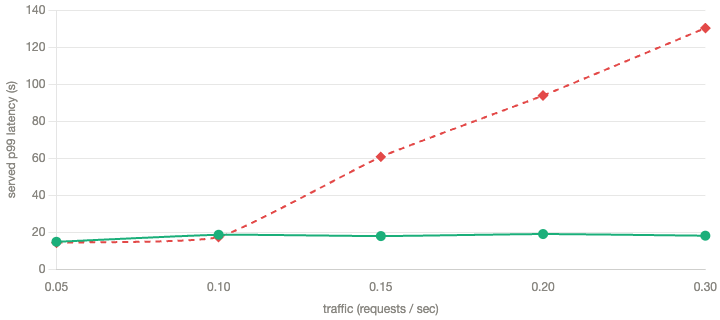
Using the following commands, I was able to simulate exact same traffic sweep twice: once with admission control on, and once off.
GATEWAY=<gateway-ip>:9000 ./sweep.sh on
# restart gateway with MAX_INFLIGHT=100000, then:
GATEWAY=<gateway-ip>:9000 ./sweep.sh off| Traffic (req/s) | p99 with admission control | p99 without |
| 0.05 | 15s | 14s |
| 0.10 | 19s | 17s |
| 0.15 | 18s | 61s |
| 0.20 | 19s | 94s |
| 0.30 | 18s | 130s |
With admission control, the p99 stays flat at ~18 seconds. The gateway simply sheds the overflow. The system stays fast and fails a predictable fraction of traffic loudly and instantly, rather than failing everyone silently.
Scaling Up and Hunting a Routing Bug
To make this truly distributed, I needed my gateway to route requests intelligently. Because my Phi-4-mini worker is smaller and finishes faster, it naturally frees up slots quicker than the Qwen3 workers. But while watching the logs, I noticed something strange: when traffic was low and multiple workers were tied at zero active requests, my router was heavily favoring the exact same worker every time.
The bug? The sorting algorithm was quietly breaking ties by the order of the list. The first worker in the array was taking all the initial heat. A simple one-line random shuffle before the sort fixed it entirely, spreading the load perfectly.
Testing the failover
With the routing fixed, I wanted to test the failover myself. When I intentionally killed a worker, the gateway dropped it from the routing pool immediately, and the surviving workers picked up the slack without dropping a single active request. At that time the logs looked something like this:
2026/07/05 10:48:08 worker2 health -> healthy=false
2026/07/05 10:48:17 worker1 healthy=true inflight=2 served=19
2026/07/05 10:48:17 worker2 healthy=false inflight=2 served=17 ===> I killed the server on worker node 2
2026/07/05 10:48:17 worker3 healthy=true inflight=2 served=22
2026/07/05 10:48:17 fleet rejected(429)=51 unavailable(503)=0
2026/07/05 10:48:37 worker1 healthy=true inflight=2 served=21
2026/07/05 10:48:37 worker2 healthy=false inflight=2 served=17
2026/07/05 10:48:37 worker3 healthy=true inflight=2 served=25
2026/07/05 10:48:37 fleet rejected(429)=56 unavailable(503)=0
Lessons from this activity
- This world of AI engineering and serving the models is truly an engineering feat. I have not yet gone into the realms of touching GPU related stuff which currently all frontier labs rely on. I am fascinated and I will continue diving more into this and sharing things as I learn.
- Serving an opensource model over just the 3 nodes exposed me to several core concepts on how these model actually run on CPU (quantization math is again I need to dive into)
- Limiting requests to users might be considered good for small scale but eventually who wants to retry their requests.
If you have reached till here, please do try out things on your own.
Check out the full code and setup in the repo: https://github.com/abhinav1592/distributed-ai-gateway-demo-with-local-machine
